
Keyboard
$69.00
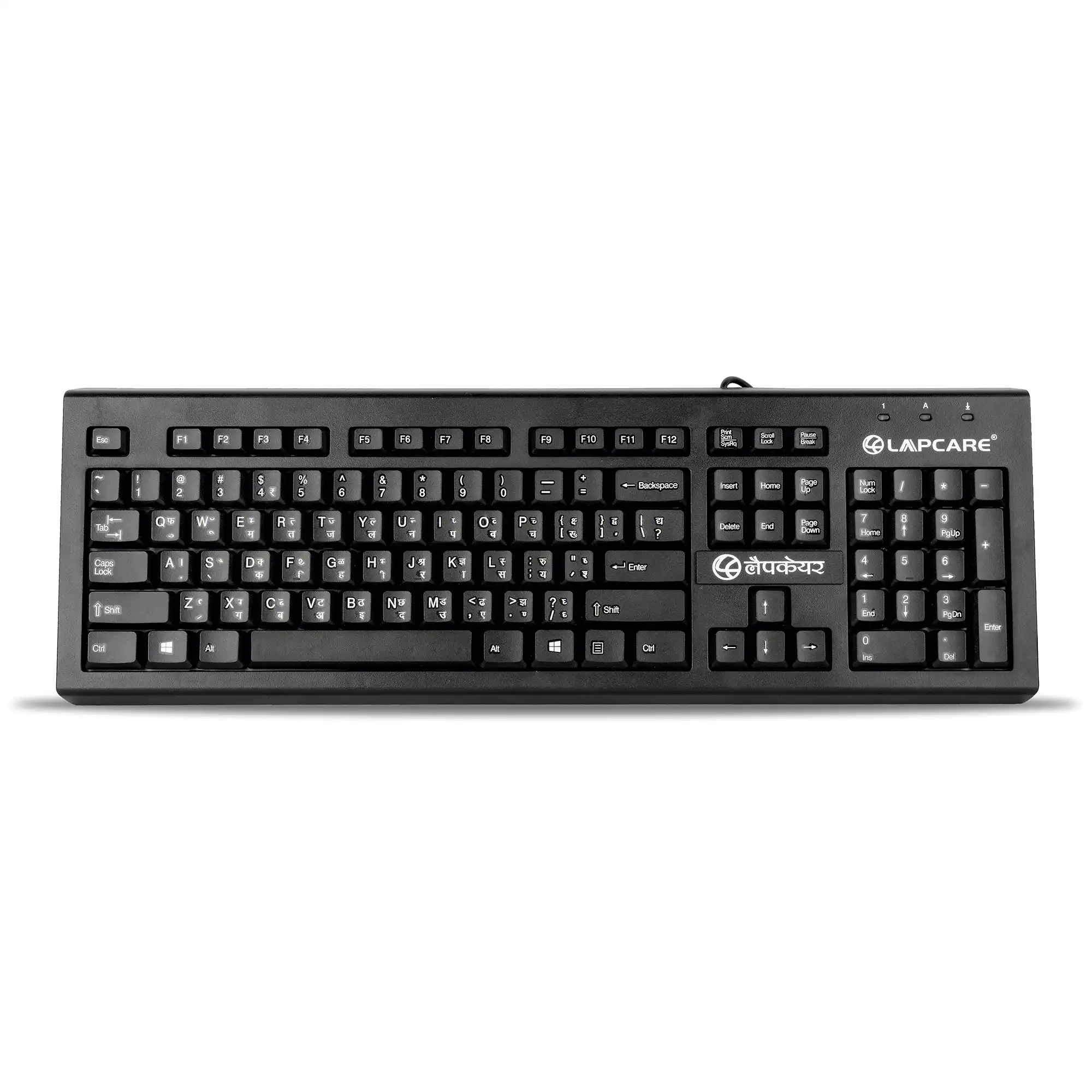
A keyboard is an essential input device that allows users to communicate with computers, laptops, and other digital systems by typing characters, numbers, and commands. From traditional mechanical models to modern wireless and ergonomic designs, keyboards remain the primary tool for text entry, gaming, and professional work.
A keyboard is one of the most widely used and recognizable input devices in the world of computing. It acts as a bridge between humans and machines, allowing users to send instructions, write content, and control digital environments. Whether for professional tasks, educational use, gaming, or casual browsing, keyboards are indispensable tools that shape how we interact with technology every single day.
1. Introduction to Keyboards
The keyboard is modeled after the typewriter, one of the earliest text-entry devices. The modern computer keyboard, however, is far more advanced, incorporating numerous keys, shortcuts, and functions beyond just letters and numbers. It typically consists of the standard QWERTY layout, but many variations exist depending on the region, purpose, and user preference.
Today, keyboards are not just about typing—they are specialized for different activities, such as mechanical keyboards for gaming, ergonomic keyboards for reducing wrist strain, and compact keyboards for mobile and travel-friendly use.
2. Structure and Layout
Most keyboards consist of around 104 keys, though the number may vary. Common sections include:
Alphanumeric Keys: Letters (A-Z), numbers (0-9), and symbols.
Function Keys (F1-F12): Located at the top, these provide quick shortcuts like refreshing a page or adjusting brightness.
Modifier Keys: Shift, Ctrl, Alt, and Windows/Command keys used in combination with other keys for commands.
Navigation Keys: Arrow keys, Home, End, Page Up, and Page Down.
Numeric Keypad: A calculator-style number pad on the right, useful for accountants or data entry tasks.
The design ensures users can efficiently type, navigate, and control their computer. Some advanced keyboards even feature multimedia keys, backlighting, programmable macros, and touch-sensitive surfaces.
3. Types of Keyboards
Keyboards come in many types, each serving specific needs.
Mechanical Keyboards – Use individual mechanical switches for each key, offering tactile feedback and durability. Popular with gamers and typists.
Membrane Keyboards – Softer, quieter, and more affordable. Keys press down on a pressure pad to register input.
Wireless Keyboards – Connect via Bluetooth or a USB receiver, reducing cable clutter.
Ergonomic Keyboards – Designed to reduce strain by splitting the keyboard into two angled halves.
Gaming Keyboards – Feature RGB lighting, programmable keys, anti-ghosting technology, and rapid response switches.
Virtual/On-Screen Keyboards – Found on smartphones, tablets, and touchscreens.
Foldable and Compact Keyboards – Travel-friendly, lightweight, and portable options.
4. History and Evolution
The story of keyboards began with the typewriter in the 19th century. Christopher Latham Sholes invented the QWERTY layout in 1873, which remains the most widely used layout globally.
With the rise of computers in the mid-20th century, typewriter-style keyboards were adapted into digital systems. The first personal computers, like IBM PCs in the 1980s, used mechanical keyboards. Over time, advancements in materials, wireless technology, and ergonomic research gave birth to the diverse keyboard designs we have today.
5. Importance in Daily Life
Keyboards are used in almost every aspect of modern life:
Work & Business: For emails, reports, data entry, and office applications.
Education: Essential for online learning, research, and assignments.
Gaming: Specialized gaming keyboards give players faster response times.
Creativity: Writers, programmers, designers, and musicians rely heavily on keyboards for creation and editing.
Accessibility: Custom keyboards help individuals with disabilities to communicate and interact with computers.
6. Keyboard Technologies
Behind every keypress lies sophisticated technology. Some innovations include:
N-Key Rollover (NKRO): Allows multiple keys to be pressed simultaneously without error, useful for gamers.
Backlit & RGB Lighting: Enhances visibility in low light and adds aesthetic appeal.
Wireless Charging & Solar Power: Modern keyboards use rechargeable batteries or even solar energy.
Haptic Feedback: Provides vibration or resistance for a more tactile experience in touch keyboards.
7. Ergonomics and Health
Prolonged typing can cause strain on the wrists, fingers, and shoulders. Conditions like Carpal Tunnel Syndrome have been linked to poor typing posture. To address this, ergonomic keyboards and wrist rests are recommended. Additionally, proper desk setup, regular breaks, and correct typing techniques are essential for long-term health.
8. Future of Keyboards
As technology advances, keyboards are evolving in exciting ways:
Virtual Reality (VR) Keyboards: Immersive typing experiences inside virtual environments.
Voice-to-Text Integration: Combining typing with AI-driven voice input.
Flexible & Rollable Keyboards: Ultra-portable devices made of silicone or fabric.
AI-Powered Keyboards: Predictive text, smart corrections, and adaptive layouts based on user habits.
While some predict voice assistants and touchscreens may reduce dependency on physical keyboards, it’s likely that keyboards will remain central to computing due to their speed, accuracy, and tactile satisfaction.
9. Choosing the Right Keyboard
Selecting the perfect keyboard depends on user needs:
For Professionals: Ergonomic or mechanical keyboards improve typing speed and comfort.
For Gamers: Mechanical, RGB-lit keyboards with macro support are ideal.
For Students/Travelers: Lightweight wireless or compact keyboards are best.
For General Use: Membrane or budget-friendly keyboards serve everyday purposes.
10. Conclusion
The keyboard is more than just an accessory—it is the primary communication tool between humans and digital machines. From its typewriter roots to today’s advanced wireless and mechanical designs, the keyboard has continuously evolved to meet the needs of different users.
In offices, schools, homes, and gaming setups, keyboards remain an essential part of modern life. As technology pushes forward, the keyboard will continue adapting, blending traditional key-based input with futuristic innovations like AI, VR, and flexible designs.
In short, the keyboard is the unsung hero of the digital world, shaping how we work, play, and create.


Reviews
There are no reviews yet.